Ready to Get Your VFD Solution?
Whether you need a single drive or a complete system, we have the VFD products and engineering support to ensure your project's success.


This VFD troubleshooting guide covers the most common VFD troubleshooting issues: overcurrent, overvoltage, undervoltage, overtemperature, ground fault, output phase loss, and communication errors. Most variable frequency drive problems can be diagnosed systematically by recording the fault code, checking what the drive was doing when it faulted, and testing whether the fault repeats with the motor disconnected.
Picture this: it’s 4:47 p.m. on a Friday. A packaging line in Ohio goes silent because of a variable frequency drive problem. The operator points at a VFD display flashing E.OC1 and says, “It just stopped.”
No tools are out yet, no one has checked the conveyor, and the maintenance supervisor is already talking about replacing the drive. In reality, that fault is a conversation starter, not a death sentence. This guide will teach you how to have that conversation methodically so you can get the equipment running again without throwing parts at the problem.
Key Takeaways
- Record the VFD fault code before resetting anything; resetting erases the evidence you need to diagnose the root cause.
- About 80% of VFD trips fall into four categories: current faults, voltage faults, temperature faults, and connection faults.
- Always verify lockout/tagout and zero-energy state before touching terminals, capacitors, or motor leads.
- A brand-agnostic fault code table lets you translate alarms across ABB, Siemens, Mitsubishi, Yaskawa, Danfoss, and Delta drives.
- Incorrect parameter settings cause an estimated 60% of post-installation VFD faults, so verify motor data before blaming hardware.
- The ten VFD troubleshooting common issues below follow predictable patterns, so a systematic method beats repeated resets.
If you are still in the selection phase, learn how to choose the right VFD for your application to avoid mismatched drive-motor pairs from the start.

Troubleshooting a VFD starts long before you open the keypad menu. It starts with safety discipline and a repeatable diagnostic routine.
A VFD stores lethal DC bus voltage for several minutes after power is removed. Always follow these steps:
Skipping step 3 is how experienced technicians get hurt. The drive may look dead and still bite.
Resetting a VFD clears the active fault but does not fix the cause. Write down the code, note the drive’s operating state when it occurred (accelerating, running at speed, decelerating, or idle), and record any recent changes to the system. This habit alone will cut your troubleshooting time in half.
Ask these four questions before reaching for a screwdriver:
If the fault only happens with the motor connected, look downstream. If it happens with the motor disconnected, look at the drive, parameters, or supply.
Different manufacturers use different VFD fault codes for the same physical fault. The table below maps common symptoms and VFD fault codes across major brands. Always confirm against your drive’s manual or a trusted reference such as Eaton’s VFD fault code guide, but this gives you a fast translation layer.
| Fault Type | ABB | Siemens | Mitsubishi | Yaskawa | Danfoss | Delta |
|---|---|---|---|---|---|---|
| Overcurrent | 2310 | F0001 | E.OC1 / E.OC2 / E.OC3 | oC | 4 / 13 | oc |
| Overvoltage | 3210 | F0002 | E.OV1 / E.OV2 / E.OV3 | ov | 7 | ov |
| Undervoltage | 3220 | F0003 | E.UVT | Uv1 / Uv2 / Uv3 | 8 / 14 | uv |
| Overtemperature | 4210 | F0004 / F0011 | E.FIN / E.OHT | oH | 29 | oH |
| Ground Fault | 2330 | F0026 | E.GF | GF | 14 / 22 | gF |
| Output Phase Loss | 3130 | F0018 | E.LF | PF | 15 | oL |
Keep this table on your phone or clipboard. When a code appears, you will know immediately which family of problems you are hunting.

These are the failures field engineers see most often. Each section explains what the fault means, why it happens, how to isolate it, and how to fix it. Master these ten VFD troubleshooting common issues and you will handle most field calls without guessing.
A VFD overcurrent fault is the most common VFD fault category, representing roughly 35–45% of all trips. It means the drive detected output current above its safe threshold.
Common causes:
Diagnosis:
Disconnect the motor leads and try to run the drive at low speed. If the fault clears, the problem is in the motor or cabling.
If the fault persists, inspect the drive output stage. Megger the motor and cable insulation; look for values below 5 MΩ at 500 V DC.
Fix:
Lengthen the acceleration ramp. Verify motor nameplate data in parameters. Clear the mechanical obstruction. Replace damaged cables or motors. If the IGBT stage is shorted, repair or replace the drive.
In the Ohio packaging plant case, the flashing E.OC1 turned out to be an acceleration time left at 0.5 seconds on a 22 kW conveyor. Lengthening the ramp to 4 seconds eliminated the trip completely. No hardware was damaged. The operator had simply copied parameters from a smaller drive.
Overvoltage means the DC bus voltage exceeded the drive’s limit. This almost always happens during deceleration when the motor becomes a generator and pumps energy back into the drive.
Common causes:
Diagnosis:
Watch the DC bus voltage on the keypad during a stop. If it spikes just as the drive decelerates, regeneration is the culprit. Measure input line voltage against the drive rating.
Fix:
Lengthen the deceleration ramp. Add or resize a dynamic braking resistor. For high-inertia loads, consider a regenerative unit. Before investing, calculate VFD energy savings to determine payback and whether regenerative braking fits your budget. Verify that incoming voltage matches nameplate ratings.
At a Durban water treatment plant, a pump VFD kept tripping overvoltage every time it shut down. The decel time was 2 seconds for a high-inertia centrifugal pump. Adding a correctly sized braking resistor solved the problem in one afternoon.
Undervoltage means the DC bus dropped below the drive’s operating threshold. It can be a real supply problem or a connection problem inside the cabinet.
Common causes:
Diagnosis:
Measure line-to-line voltage at the drive input terminals under load, not at the panel door. Voltage may look fine at no load but sag severely when current flows. Re-torque terminals and check all fuses.
Fix:
Tighten connections. Replace blown fuses. Enable ride-through or restart parameters if your application allows. If the fault recurs on a healthy supply, have the DC bus capacitors tested; aging caps cannot hold voltage under load.
Overtemperature faults protect the drive’s power semiconductors. Because semiconductor life roughly halves for every 10°C above rated temperature, this protection is not optional.
Common causes:
Diagnosis:
Visually inspect the heatsink fins and fan. Measure ambient temperature near the drive. Check whether the carrier frequency is set higher than necessary. Listen for fan noise; a silent fan when the drive is running is a failed fan.
Fix:
Clean heatsink fins with low-pressure dry air. Replace the fan. Improve cabinet ventilation or add cooling. Reduce carrier frequency if audible motor noise is acceptable. If the drive is undersized for the load, consider a properly sized VFD.
A ground fault means current is leaking from the output circuit to earth. This is both a reliability issue and a safety issue.
Common causes:
Diagnosis:
Lock out the drive. Disconnect the motor cable and megger both the motor windings and the cable separately. Insulation resistance should be greater than 5 MΩ at 500 V DC, consistent with NEMA MG1 motor insulation and thermal standards. Check junction boxes for water, corrosion, or damaged seals.
Fix:
Dry and reseal junction boxes. Replace degraded cable. Repair or rewind the motor if insulation is compromised. For cable runs over 50–100 meters, add an output reactor or dV/dt filter to reduce reflected waves.
Output phase loss means the drive detected an open circuit on one of its output phases. The motor may still run but will overheat and vibrate.
Common causes:
Diagnosis:
With power locked out, check continuity from drive output terminals to motor terminals phase by phase. Inspect terminals for discoloration, arcing, or looseness. Measure motor winding resistance.
Fix:
Re-torque all output terminals. Repair or replace the motor if a winding is open. Replace any blown fuses after determining why they blew. If one IGBT phase is failed, replace or repair the drive.
A VFD not running with no fault code is one of the most frustrating calls because the keypad shows nothing wrong, yet the motor sits still.
Common causes:
Diagnosis:
Try starting the drive from the keypad in local mode. If it runs locally, the drive and motor are fine; the problem is in control wiring or parameters. Check digital input status on the display. Verify the frequency reference source and value.
Fix:
Switch control source as needed. Close safety circuits. Verify that the frequency reference is above the minimum start frequency.
During a commissioning in Sao Paulo, a VFD would not start despite a healthy display. The control source parameter had been left on Modbus from factory testing, but the site was wired for terminal control. Switching one parameter restored operation instantly.
The drive is enabled, current is flowing, but the motor only buzzes and does not turn.
Common causes:
Diagnosis:
Try to rotate the motor shaft by hand with power off. If it will not turn, inspect the load. Measure voltage at the motor terminals while the drive is enabled; look for a missing phase. On single-phase capacitor-start motors, test the capacitor.
Fix:
Free the mechanical load. Replace a failed capacitor. Adjust V/f torque boost if the load demands high starting torque. Repair the motor if a winding is open. For demanding starts, consider vector control or sensorless vector mode.
Communication faults appear when the drive cannot reliably exchange data with a PLC, SCADA system, or HMI.
Common causes:
Diagnosis:
Check the drive’s communication status parameter or error counter. Verify baud rate, parity, data bits, and stop bits match the master. Confirm node addresses are unique. Inspect shield grounding at one end only.
Fix:
Match protocol settings exactly. Add a 120 Ω termination resistor at each end of the RS-485 bus. Ground the shield at one point only, typically the master side. Reduce baud rate or add a repeater for long cable runs.
Intermittent faults are the hardest to solve because they disappear before you can measure them. They are usually caused by electrical noise or power quality issues.
Common causes:
Diagnosis:
Look for patterns. Does the fault happen when a nearby welder fires? When a large contactor pulls in? At a specific time of day? Use a power quality analyzer to capture transients.
Fix:
Use shielded motor cable with the shield bonded at both ends. Separate power and control cables by at least 300 mm. Add ferrite cores or EMI filters. Verify star-point grounding. Install input reactors or surge protection if power quality is poor. IEEE 519 provides harmonic and power quality limits relevant to VFD installations.
Following installation and grounding best practices during initial setup prevents most nuisance tripping before it starts.
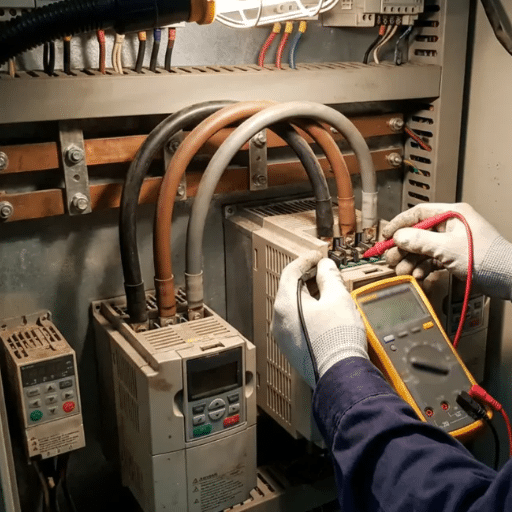
Use this decision tree for VFD troubleshooting common issues so you avoid random resets and wasted parts.
Consider replacement when:
For mission-critical systems, keeping a spare drive on-site often costs less than one unplanned shutdown.
Incorrect VFD parameters cause an estimated 60% of post-installation faults and are among the most common preventable VFD troubleshooting issues. They are also one of the leading sources of variable frequency drive problems after commissioning. Before replacing hardware, verify these settings against the motor nameplate:
If you are commissioning a new system, our VFD parameter settings guide walks through each critical setting step by step.
A structured maintenance program catches many VFD troubleshooting common issues while they are still cheap to fix.
Quarterly:
Annually:
After power events:

Print this checklist and keep it in your toolbox or maintenance locker so you have a repeatable process for VFD troubleshooting common issues.
VFD troubleshooting common issues follow predictable patterns, and this VFD troubleshooting guide gives you a systematic way to solve them. Roughly 80% of trips fall into four categories: current, voltage, temperature, and connection. The difference between a fast fix and a long outage is usually discipline: record the code, ask the four diagnostic questions, and test with the motor disconnected before assuming the drive is failed.
Start with safety, verify parameters, and resist the urge to reset repeatedly. Most variable frequency drive problems are solved with patience and a methodical process, not new hardware. If a fault keeps returning after you have addressed the obvious causes, escalate to a methodical repair-or-replace decision.
Need help diagnosing a stubborn fault? Contact our engineering team for technical support, commissioning assistance, or browse replacement VFDs for a matched drive. For more guidance, explore how to choose a VFD and our related troubleshooting resources.